How to Play a Godot 4 HTML Project Locally?
I have exported the web version of my Godot 4, it is in a folder on my local drive.
Because of the SharedArrayBuffer dependency I can not just double-click in the index.html file. If I do so I see this error:
Error The following features required to run Godot projects on the Web are missing: Cross Origin Isolation - Check web server configuration (send correct headers) SharedArrayBuffer - Check web server configuration (send correct headers)
How can I run it in local?
Solution
For testing purposes, Godot can export and host your game locally through one-click deploy. After setting up your export template, go to the top-right corner, click the fourth button from the left ("Remote Deploy"), and select "Run in Browser".
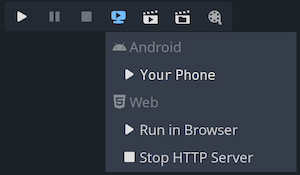
- Load an image for WebGL texture but failed because of CORS
- Making a NaN on purpose in WebGL
- What is typical webgl MAX_TEXTURE_SIZE in 2023?
- Javascript Typed Arrays and Endianness
- PlayerPrefs won't update between simultaneous players
- Lower WebGL Render Resolution, and Increase FPS
- Webgl2 maximum size of 3D texture?
- Is it possible to share a WebGL context between JavaScript and WebAssembly?
- Is there a substitute for glPolygonMode() in OpenGL ES/WebGL?
- Strategy Game Server Concept
- Is WebGL supposed to be stretched out on canvas
- WebGL is disabled error when opening bing maps with python selenium?
- How to Play a Godot 4 HTML Project Locally?
- Reconstruct fragment position from depth
- WebGL terrain grid shrinking after 128 pixels
- Firefox throw a n error drawArraysInstanced: but attribs only supply 0, when I make drawArrays while Chrome is good
- Unable to parse Build/build.framework.js.br
- webgl canvas with shader not filling screen
- How do I convert a vec4 rgba value to a float?
- How to get object in WebGL 3d space from a mouse click coordinate
- Ambiguous information about WebGL clip space
- WebGL: How do I get the position of every pixel in fragment shader?
- WEBGL: INVALID_VALUE: vertexAttribPointer: index out of range, INVALID_VALUE: enableVertexAttribArray: index out of range
- What's the state of OffscreenCanvas's support for 2d context?
- Overwrite video element: display a different image (manually decoded frame) & WebGL compatibility
- WebGL - is there an alternative to embedding shaders in HTML?
- Export Asymptote graph to WebGL
- How do you render to an integer renderbuffer in webgl?
- RangeError: too many arguments provided for a function call createUnityInstance
- GL ERROR :GL_INVALID_OPERATION : glDrawArrays: attempt to access out of range vertices in attribute 1, three.js