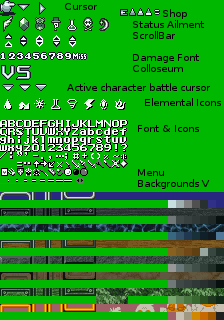
There seem to be cross-browser differences in CanvasRenderingContext2D.drawImage. In the following example, I've noticed that Firefox (Mac 146) and Brave (Mac 1.85.118) not only both change the colors if you enter a data URL for an image but do so differently. Firefox will keep the same number of colors but make slight changes to them. Brave will add new colors that are very similar to the existing colors, e.g., if the original color is #A06068, I'll also end up with #A06069 and #A16068 in the resulting image.
I tested this by putting the resulting data URL into my browser bar, copy-pasting into GIMP, cropping out irrelevant areas, and switching to indexed mode.
Is there any way to keep the original colors across all browsers? Or at least keep the process consistent across browsers?
<!DOCTYPE html>
<html>
  <head>
    <script type="text/javascript" src="index.js"></script>
  </head>
  <body>
    <div><textarea id="textarea"></textarea></div>
    <div><button id="button">Log</button></div>
  </body>
</html>
const sillyLog = (sourceUrlString) => {
    const img = new Image();
    try { const sourceUrl = new URL(sourceUrlString); console.log(`using ${sourceUrl.protocol} source URL`, sourceUrlString); }
    catch { console.log(`using source URL`, sourceUrlString) }

    img.onload = () => {
        const canvas = document.createElement("canvas");
        canvas.width = img.width;
        canvas.height = img.height;
        canvas.getContext("2d").drawImage(img, 0, 0)

        const resultUrlString = canvas.toDataURL("image/png");
        const resultUrl = new URL(resultUrlString)
        console.log(`got ${resultUrl.protocol} result URL`, resultUrlString);
    }
    img.src = sourceUrlString;
}

window.onload = () => {
    document.getElementById('button').onclick = () => {
        const textarea = document.getElementById('textarea');
        sillyLog(textarea.value);
    }
}
JSFiddle: https://jsfiddle.net/codergal6502/ky5qrfcu/
For reference, I generated my initial data URL by entering https://www.spriters-resource.com/media/assets/52/54693.png?updated=1755473108 into https://ezgif.com/image-to-datauri.
Yeah this is expected behavior, and it’s not PNG compression. The color changes come from browser-specific color management and alpha handling during the decode to canvas to encode path. Different browsers apply slightly different rounding, which shows up as near-identical new colors when you later index the image.
you see “new” near-identical colors because of
1. Color management / profiles / gamma, and this is When an image is decoded, browsers may apply ICC/gamma handling differently, and when drawn to canvas they convert into the canvas’ working color space (often sRGB, sometimes influenced by wide-gamut displays). And different implementations can produce slightly different 8-bit rounding, which becomes visible when you later quantize/index the output. MDN and the HTML spec explicitly expose canvas color spaces (srgb, display-p3) because this has been an issue.
2. Premultiplied alpha. Canvas 2D pipelines commonly use premultiplied alpha internally; when pixels have transparency (especially anti-aliased edges), the RGB channels can be altered by multiply/divide + rounding, creating off-by-1 channel differences.
You cannot guarantee “bit-exact, same RGB triplets” across all browsers for arbitrary inputs, but you can make it far more consistent by Forcing the canvas to sRGB and 8-bit
const ctx = canvas.getContext("2d", {
  colorSpace: "srgb",
  colorType: "unorm8",
  alpha: true, // or false (see below)
});
(srgb is default, but setting it removes ambiguity across wide-gamut systems.)
Decode with createImageBitmap and disable color conversion (where supported)
const bitmap = await createImageBitmap(img, {
  colorSpaceConversion: "none",
  premultiplyAlpha: "none",
});
ctx.drawImage(bitmap, 0, 0);
colorSpaceConversion: "none" is specifically intended to ignore embedded profiles / conversions and keep decode consistent.
You know browser support/behavior still varies in edge cases (the spec and implementations are actively discussed), but this is the closest you get in today’s web platform.
If you don’t need transparency, use an opaque canvas
If the source image effectively has no meaningful alpha (or you can accept flattening), this avoids a lot of premultiply/unpremultiply rounding:
const ctx = canvas.getContext("2d", { alpha: false, colorSpace: "srgb" });
Ensure you are not triggering resampling
Not your case (no scaling), but if you ever scale
ctx.imageSmoothingEnabled = false;
If you need exact color preservation, Do not use drawImage for transcoding. Fetch the PNG bytes and decode/encode deterministically in JS/WASM. Canvas is for rendering, not canonical image processing, and cross-browser pixel differences are expected.